Integration API Sonar 3D-15🔗
Introduction🔗
The Water Linked Sonar 3D-15 provides real-time 3D views of underwater environments using a low-bandwidth Range Image Protocol (RIP2). This protocol efficiently transmits data such as 3D points or grayscale bitmaps over UDP, enabling live visualization, analysis, or archival for later use.
The Sonar 3D-15 also exposes a HTTP API for configuration and inspection of system state.
A Python example implementation of the Sonar API is available on github.
Range Image Protocol (RIP2)🔗
RIP2 is a compact format for range and bitmap images, designed for <10 Mbit bandwidth.
NOTE: Some Sonar 3D-15 releases support sending RIP1 packets. RIP1 will be removed in a future release.
Packet structure🔗
The packet format is designed to fit within a single UDP packet, introducing an upper limit of 65,507 bytes.
This is the structure of a RIP2 packet:
| Number of bytes | Description |
|---|---|
| 4 | 0x82 0x73 0x80 0x50, Identifier which reads "RIP2" in ASCII |
| 4 | Packet length (including identifier, packet length, payload and checksum) |
| payload length (packet length - 12) | Encoded protobuf message, compressed with Snappy |
| 4 | IEEE 802.3 CRC-32 of the preceding bytes in the packet |
Decoding Steps:
- Verify the "RIP2" ID.
- Read packet length.
- Read compressed payload and CRC-32, and verify the CRC-32.
- Decompress the payload into an encoded protobuf packet.
- Decode into the
Packetmessage type (see.protofile) - Use
.msg.type_urlto identify the contained message. - Decode
.msg.valueinto that message type (see.protofile)
Transmission🔗
RIP2 transmission is disabled by default. The HTTP API can be used to configure UDP multicast to 224.0.0.96:4747, or UDP unicast to a given destination address and port. The configuration is persistent, meaning it is kept on restart.
UDP multicast allows transmitting RIP2 packets to devices on the local network without requiring the sonar to know the receiver's IP, and vice versa.
UDP unicast allows transmitting RIP2 packets to a given destination address and port, and can be routed across networks.
Because UDP does not guarantee delivery or ordering, packets may be lost, reordered, or duplicated. Use message sequence numbers to address this.
It is also possible to record RIP2 packets through the GUI.
Image Sizes and Update Rates🔗
| Mode | Resolution (W×H) | FOV (H×V) | Rate |
|---|---|---|---|
| Low Frequency | 256 × 64 | 90° × 40° | 5 Hz |
| High Frequency | 256 × 64 | 40° × 40° | 20 Hz |
Message Types🔗
RIP2 supports several Protobuf-encoded messages. See Protobuf packet description for message definitions. Some key messages are described below.
BitmapImageGreyscale8🔗
- 8-bit grayscale; each pixel = signal strength or shaded depth.
typeenum differentiates signal strength vs. shaded.
RangeImage🔗
- Each pixel represents distance (radius) to the strongest reflection.
0= no valid data.radius = pixelValue * imagePixelScale.
ImuBatch🔗
- Measurements of specific force and rate of turn from an internal IMU, sampled at 100 Hz. The sonar does not filter or resample the data.
- The IMU itself outputs each sample as an average over the 10 ms sample period ending at its timestamp, not an instantaneous reading. To integrate, multiply each sample by 10 ms and sum. The result is valid at the timestamp of the last sample used.
specific_forceandrate_of_turnare flat arrays with three values per sample, in x, y, z order, in m/s² and rad/s. Axes follow the sonar coordinate conventions below.- Measurements are made at the position of the internal IMU within the sonar. The position offset relative to point cloud origin is -22 mm in x, -46 mm in y and -3 mm in z.
- Output in batches, with latency below 100 ms during normal operation.
- Expect occasional spikes in latency.
- Expect spikes in latency during configuration.
- Output while acoustics are enabled.
- Disabled by default. Enable using the HTTP API.
Coordinate and Image Conventions🔗
Axes (right-handed):
- Origin: The point cloud origin (
x = 0,y = 0,z = 0) is located at the mechanical center of the front transducer/receiver surface. The front surface is thex = 0plane;y = 0is centered across the122 mmwidth, andz = 0is centered across the80 mmheight, with positivezpointing downward. - x: forward
- y: right
- z: downward
Image:
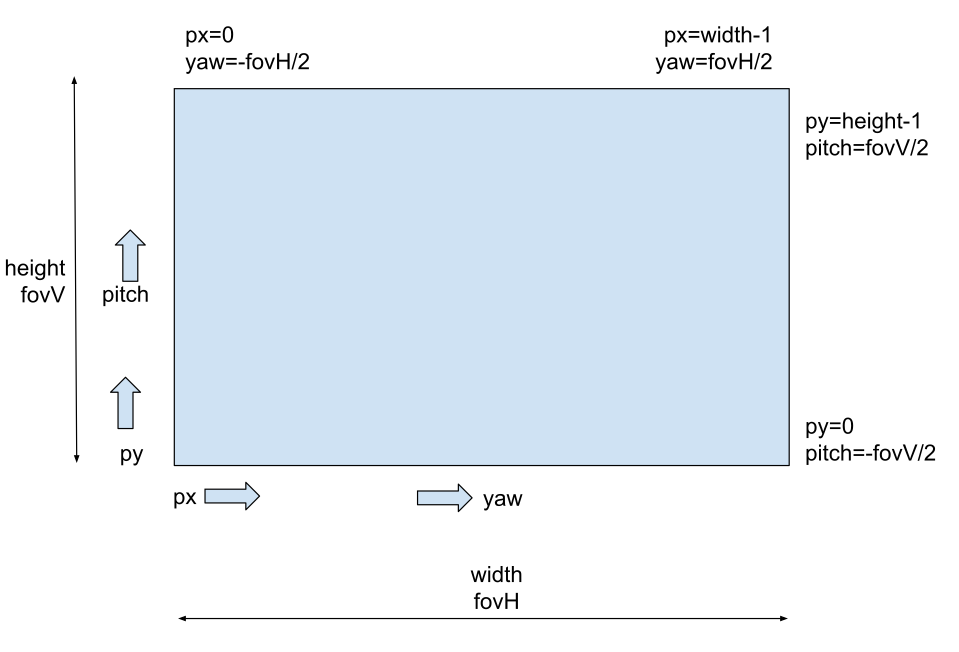
- Horizontal FOV (
fovH) spans width. - Vertical FOV (
fovV) spans height. (px, py)maps to(yaw, pitch):
Example: Converting Range Image to 3D:
// Convert pixelValue to radius in meters
if (pixelValue == 0) {
  return Undefined; // no valid data
}
radius = pixelValue * imagePixelScale;

// Convert (yaw, pitch) from degrees to radians
yaw   = deg2rad((px / (width - 1))  * fovH - (fovH / 2));
pitch = deg2rad((py / (height - 1)) * fovV - (fovV / 2));

// Cartesian conversion (x forward, y right, z down)
x = radius * cos(pitch) * cos(yaw);
y = radius * cos(pitch) * sin(yaw);
z = -radius * sin(pitch); // z is downward
Protobuf packet description🔗
The Sonar 3D-15 protobuf messages that are transmitted by the sonar is documented in a .proto file. The .proto file is used to generate code for decoding the messages in any of the supported programming languages.
Refer to the full protocol specification and the wlsonar Python library for an example implementation.
Compatibility Notes
- Additional message types/fields may be introduced.
- Decoders should ignore unrecognized messages.
- Major breaking changes will involve a new protocol identifier.
HTTP API🔗
The Sonar 3D-15 exposes a HTTP API for configuration and inspection of system state. The HTTP API is exposed on port 80 and uses paths rooted at /api/v1/integration/. JSON is used for request and response bodies. The HTTP API is documented with a swagger.json file. This file can be opened in a compatible viewer such as this one. Example code using the HTTP API exists on github.